Lab 4.0: Trivia
Write a webpage that lets users answer trivia questions.
Getting Started
Here’s how to download this lab into your own CS50 IDE. Log into CS50 IDE and then, in a terminal window, execute each of the below.
- Execute
cdto ensure that you’re in~/(i.e., your home directory, aka~). - Execute
wget https://cdn.cs50.net/2020/fall/labs/8/lab8.zipto download a (compressed) ZIP file with this problem’s distribution. - Execute
unzip lab8.zipto uncompress that file. - Execute
rm lab8.zipfollowed byyesoryto delete that ZIP file. - Execute
ls. You should see a directory calledlab8, which was inside of that ZIP file. - Execute
cd lab8to change into that directory. - Execute
ls. You should see anindex.htmland astyles.cssfile.
Implementation Details
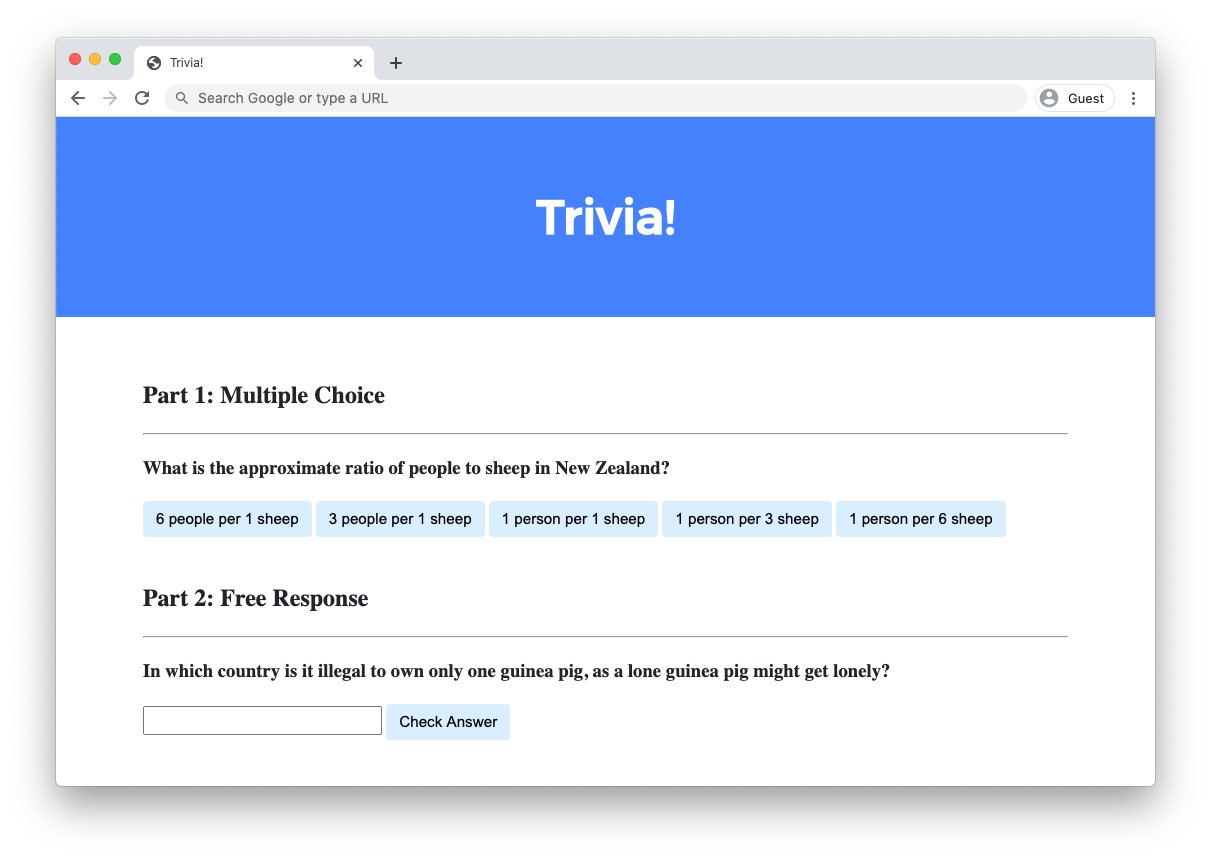
Design a webpage using HTML, CSS, and JavaScript to let users answer trivia questions.
- In
index.html, add beneath “Part 1” a multiple-choice trivia question of your choosing with HTML.- You should use an
h3heading for the text of your question. - You should have one
buttonfor each of the possible answer choices. There should be at least three answer choices, of which exactly one should be correct.
- You should use an
- Using JavaScript, add logic so that the buttons change colors when a user clicks on them.
- If a user clicks on a button with an incorrect answer, the button should turn red and text should appear beneath the question that says “Incorrect”.
- If a user clicks on a button with the correct answer, the button should turn green and text should appear beneath the question that says “Correct!”.
- In
index.html, add beneath “Part 2” a text-based free response question of your choosing with HTML.- You should use an
h3heading for the text of your question. - You should use an
inputfield to let the user type a response. - You should use a
buttonto let the user confirm their answer.
- You should use an
- Using JavaScript, add logic so that the text field changes color when a user confirms their answer.
- If the user types an incorrect answer and presses the confirmation button, the text field should turn red and text should appear beneath the question that says “Incorrect”.
- If the user types the correct answer and presses the confirmation button, the input field should turn green and text should appear beneath the question that says “Correct!”.
Optionally, you may also:
- Edit
styles.cssto change the CSS of your webpage! - Add additional trivia questions to your trivia quiz if you would like!
Hints
- Use
document.querySelectorto query for a single HTML element. - Use
document.querySelectorAllto query for multiple HTML elements that match a query. The function returns an array of all matching elements.
Testing
No check50 for this lab, as implementations will vary based on your questions! But be sure to test both incorrect and correct responses for each of your questions to ensure that your webpage responds appropriately.
Run http-server in your terminal while in your lab8 directory to start a web server that serves your webpage.